New here? Catch up in two minutes
You don't need to read everything first. Each card gives you a one-line refresher. Open the pieces that are new to you, and skip the ones you already know.
What is an AI agent?
A chatbot answers. An agent can choose steps and tools to reach a goal.
Open the beginner roadmap → LANGCHAIN · ENGLISHHow does a model call tools?
LangChain connects the model, instructions, and tools in one usable loop.
Read the LangChain guide → LANGGRAPH · ENGLISHHow can a job pause and resume?
LangGraph keeps state so a workflow can stop, wait for review, and continue.
Read the LangGraph guide → REAL EXAMPLEWhat does a bigger build look like?
The Eye shows how an onchain agent can propose while final authority stays outside the runtime.
See the full build → CLOUDYour first cloud-agent task
If you've never used an agent, start by giving a ready-made one a small, bounded task.
Try the cloud version → ON YOUR COMPUTERYour first offline agent task
Run the same task on your computer and feel the trade-offs in privacy, setup, and speed.
Try the offline version →The earlier guides introduced the LEGO pieces. Here, we put them together and build a small system you can actually run.
What will you have at the end?
It reads a request and proposes a structured action.
Amounts or destinations outside policy are blocked before human review.
LangGraph keeps state while you approve or reject.
The agent never sees a seed phrase or private key.
Speculos lets you inspect a Ledger App interface without a device.
You prove that a dangerous request really gets stopped.
See the whole project before you code
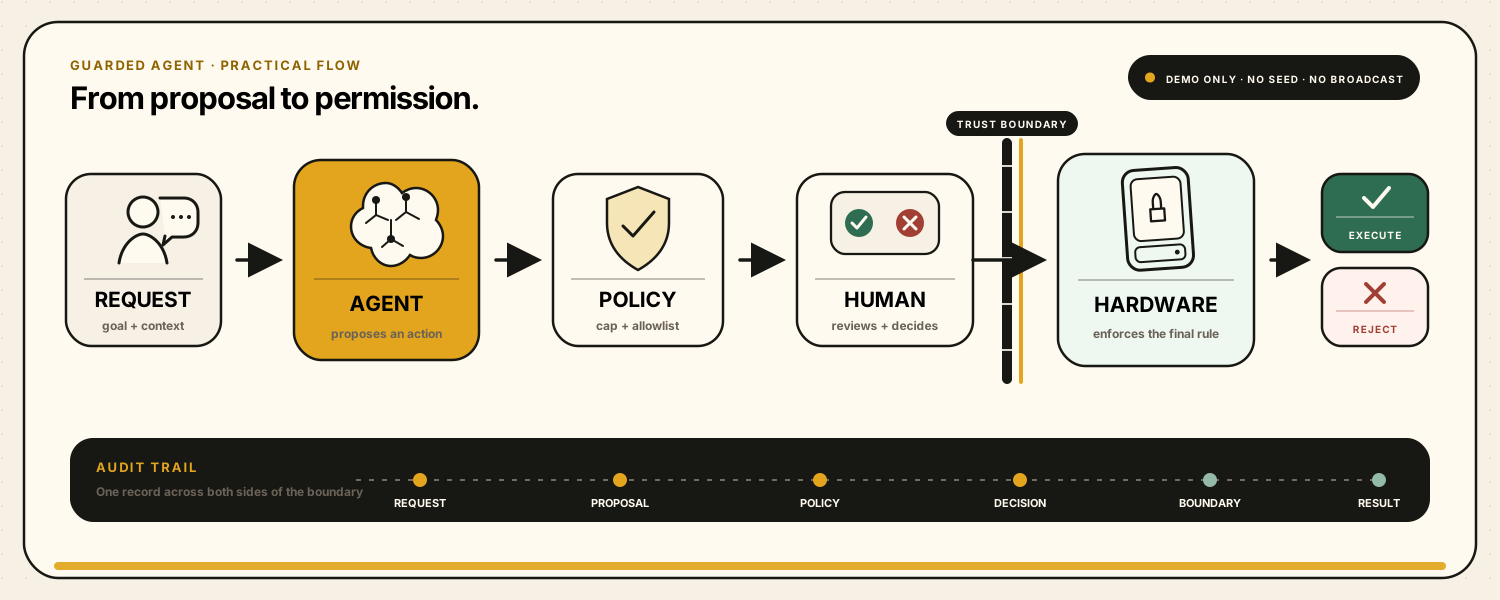
Human approval must not bypass a hard policy. If the limit is 0.01, a person can't wave a 1-unit request through this flow. The policy itself has to be changed through a separate, controlled process.
Install these before you start
Python 3.11 or newer
The project runs in Python. After installing it, run python3 --version in Terminal.
Ollama for a free model on your computer
The main path in this guide is free and local. If your machine is underpowered, you can swap the model adapter for a cloud API later.
A simple code editor
VS Code is convenient, but any editor that saves plain-text files will work.
Docker—only for the Speculos section
You don't need Docker to build the agent. We'll use it only when we reach the emulator.
Start with the fake proposal node or use a cloud API. The policy, human-review, and signer-boundary lessons do not need a huge model—and those are the most important parts of this build.
Step 1: create the project
mkdir first-guarded-agent
cd first-guarded-agent
python3 -m venv .venv
source .venv/bin/activate   # Windows: .venv\Scripts\activate
pip install langgraph langchain langchain-ollama pydantic python-dotenv
Now get a small model ready in Ollama. You can change the model to match your hardware:
ollama run qwen3:4b
Step 2: the model only creates a proposal
Our first architecture rule: the model never sees a “send” or “sign” function. Its output is only a structured proposal.
import os
from typing import TypedDict
from pydantic import BaseModel, Field
from langchain_ollama import ChatOllama
from langgraph.graph import StateGraph, START, END
from langgraph.checkpoint.memory import InMemorySaver
from langgraph.types import interrupt, Command

class TransferProposal(BaseModel):
    asset: str = Field(description="demo asset symbol")
    amount: float = Field(gt=0)
    destination: str
    reason: str

class AgentState(TypedDict, total=False):
    request: str
    proposal: dict
    policy: dict
    approved: bool
    result: str

model = ChatOllama(
    model=os.getenv("OLLAMA_MODEL", "qwen3:4b"),
    temperature=0,
)
proposal_model = model.with_structured_output(TransferProposal)

def propose(state: AgentState):
    proposal = proposal_model.invoke(
        "Create a DEMO transfer proposal only. "
        "Never claim that anything was executed. Request: " + state["request"]
    )
return {"proposal": proposal.model_dump()}Instead of accepting a messy paragraph, we make the model fill four specific fields: asset, amount, destination, and reason.
Step 3: policy gets the first decision
In this demo, only two fake destinations are allowed, and the maximum amount is 0.01. If a request breaks either rule, the flow stops right there.
MAX_AMOUNT = 0.01
ALLOWLIST = {"demo-alice", "demo-bob"}

def policy_check(state: AgentState):
    p = state["proposal"]
    reasons = []
    if p["amount"] > MAX_AMOUNT:
        reasons.append("amount is above the hard limit")
    if p["destination"] not in ALLOWLIST:
        reasons.append("destination is not allowlisted")

    return {
        "policy": {
            "allowed": not reasons,
            "reasons": reasons,
        }
    }

def after_policy(state: AgentState):
    return "review" if state["policy"]["allowed"] else "blocked"

def blocked(state: AgentState):
    return {"result": "REJECTED BY POLICY: " + ", ".join(state["policy"]["reasons"])}
Step 4: LangGraph pauses the run
interrupt() sends the proposal out for review and preserves state. Reusing the same thread_id brings the continuation back to that exact run.
def human_review(state: AgentState):
    decision = interrupt({
        "question": "Do you approve this demo proposal?",
        "proposal": state["proposal"],
        "allowed_decisions": ["approve", "reject"],
    })
    return {"approved": decision == "approve"}

def signer_boundary(state: AgentState):
    if not state["policy"]["allowed"]:
        return {"result": "REJECTED: policy cannot be bypassed"}
    if not state.get("approved"):
        return {"result": "REJECTED BY HUMAN"}

    # No seed, private key or transaction broadcast exists in this tutorial.
    # This adapter is where demo / Speculos / real hardware would be selected.
    mode = os.getenv("SIGNER_MODE", "demo")
    return {"result": f"APPROVED; handed to {mode} signer boundary (no broadcast)"}
Step 5: connect the graph
builder = StateGraph(AgentState)
builder.add_node("propose", propose)
builder.add_node("policy", policy_check)
builder.add_node("blocked", blocked)
builder.add_node("review", human_review)
builder.add_node("signer", signer_boundary)

builder.add_edge(START, "propose")
builder.add_edge("propose", "policy")
builder.add_conditional_edges(
    "policy",
    after_policy,
    {"review": "review", "blocked": "blocked"},
)
builder.add_edge("blocked", END)
builder.add_edge("review", "signer")
builder.add_edge("signer", END)

graph = builder.compile(checkpointer=InMemorySaver())
config = {"configurable": {"thread_id": "demo-1"}}

first = graph.invoke({
    "request": "Send 0.005 DEMO to demo-alice for lunch"
}, config=config)

if "__interrupt__" in first:
    print(first["__interrupt__"])
    answer = input("Type approve or reject: ").strip().lower()
    final = graph.invoke(Command(resume=answer), config=config)
    print(final["result"])
else:
    print(first["result"])
Save the file, then run it:
SIGNER_MODE=demo python agent.py
Step 6: where does Speculos fit?
Speculos is Ledger's official project for running Ledger Apps on a computer. It lets you inspect and test the interface and behavior of a compatible app without owning the device.
Speculos does not reproduce every device property, including the Secure Element and full operating-system isolation. It is useful for learning and testing—not for holding assets or claiming real hardware security.
Use Ledger's own repository and Quickstart for setup. The basic path usually looks like this:
git clone https://github.com/LedgerHQ/speculos.git
cd speculos
python3 -m venv .venv
source .venv/bin/activate
pip install .
./speculos.py apps/boil.elf
# then open http://127.0.0.1:5000
Speculos isn't a ready-made wallet. Think of it like a game console that still needs a game. The .elf file is the Ledger App running inside the emulator.
In our project, signer_boundary is the adapter point. For now, it only reports that the proposal reached the boundary. A more realistic connection needs:
| Stage | Learning version | More realistic version |
|---|---|---|
| Agent proposal | Fake JSON | Decoded, human-readable transaction |
| Policy | Amount cap + allowlist | Session scope, expiry, nonce, and budget |
| Human review | Approve/reject in Terminal | Clear destination, amount, and action meaning |
| Speculos | Practice a Ledger App UI | APDU adapter matching that app |
| Hardware | Not present | Keys stay on-device; confirm on a secure screen |
| Broadcast | Intentionally disabled | Only after valid signing and replay checks |
Run these four tests
It should reach the signer boundary, but this tutorial never broadcasts a transaction.
It should fail before human review. A person must not have a bypass path.
Even a convincing request should be rejected independently by policy.
It should end with REJECTED BY HUMAN without calling the signer.
Temporarily change propose so it always returns an amount of 999. If the architecture is working, policy will stop it regardless of the model or prompt.
What you built is not a wallet. It's the right boundary for an agent.
The model proposes. LangGraph holds the path and pause. Policy limits what may pass. A person decides. The signer stays outside the agent runtime. Speculos lets you practice the experience of a Ledger App without pretending it provides real hardware security.
Official, up-to-date references
LangGraph Interrupts — pause, checkpoint, and resume LangChain Human-in-the-loop middleware LedgerHQ Speculos — official repository, setup, and limitations Speculos Quickstart — Linux, macOS, and Windows Ollama Quickstart — local model setupDisclaimer: This project is for learning architecture with fake data. Never enter a seed phrase, private key, real assets, or a real transaction. Speculos is not a replacement for a Secure Element or a physical device. Parts of this guide's preparation and illustration were created with help from an AI agent.